
Minecraft Inventory Redesign
Role: UI/UX Designer | Project Type: Academic Solo | Duration: 3 Weeks | Tools: Figma & Adobe Photoshop
Project Overview
Project Introduction
Minecraft has added hundreds of new items since it first released, but its inventory hasn’t evolved alongside them. The current inventory system while simple and familiar, struggles to scale with the amount of content in the game. For this project in my UX Design course, I was tasked with identifying the pain points in the existing inventory system and designing an intuitive interface that could better support the current item pool and future updates.
The Problem
Players across different playstyles struggle to organize and manage their inventory as it becomes cluttered over time. Moving multiple items is slow and repetitive, and finding specific blocks or items often means clicking through several tabs of content. This turns basic actions into extra work, interrupting gameplay flow and making it harder for players to stay focused on what they actually want to do in the game.

Project Goal
Design an Inventory system that stays true to Minecraft's pillars of familiarity and simplicity, while improving usability across different player styles and scaling with future content. To support this, I set out to conduct UX research on how other games design inventories that grow over time, and gather data from Minecraft players to understand where they feel the current UI slows them down or causes friction.
This Project allowed me to work in an iconic, but constrained problem space, where I had to balance quality of life improvements with players’ resistance to big changes in a familiar system.
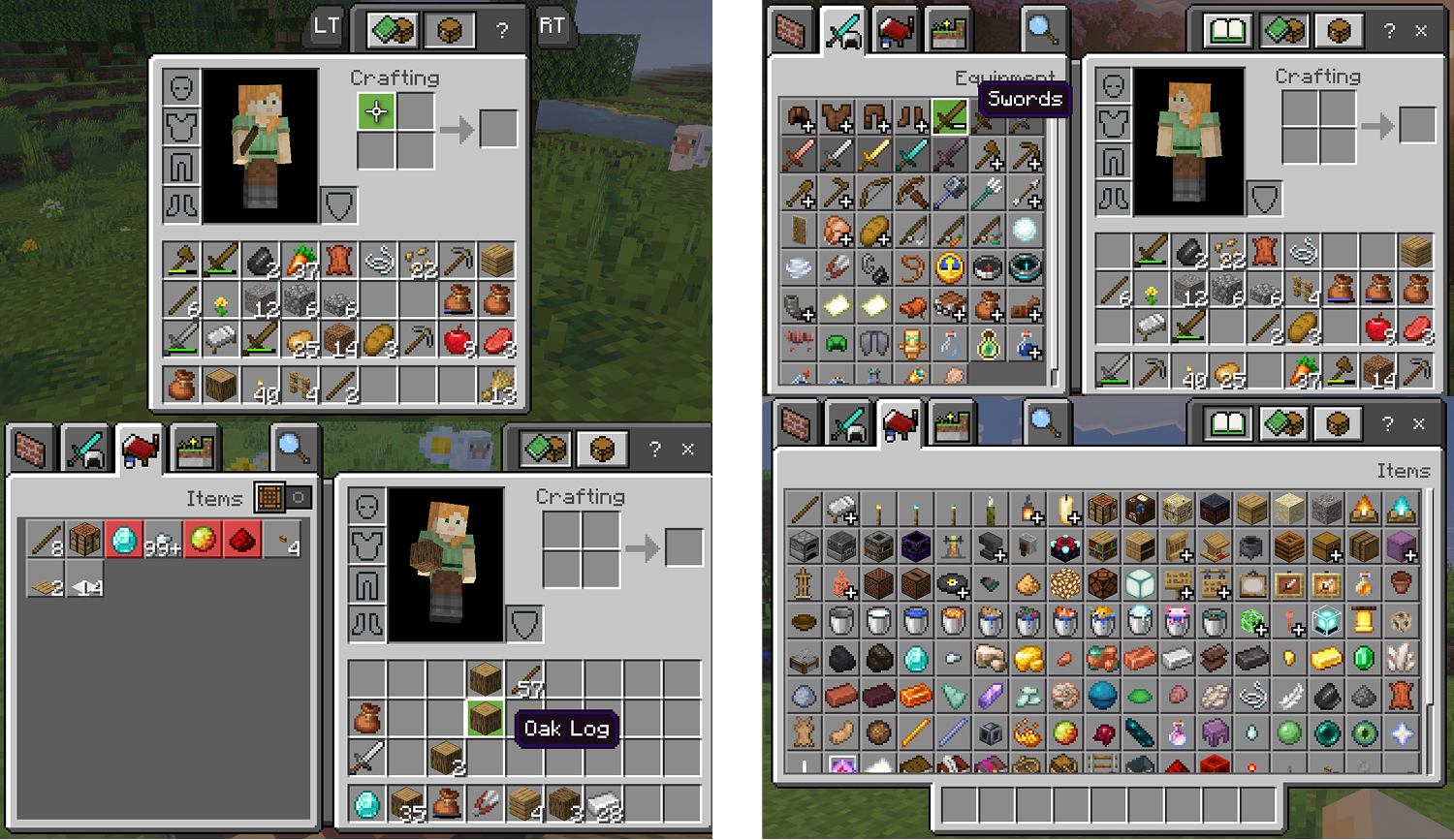
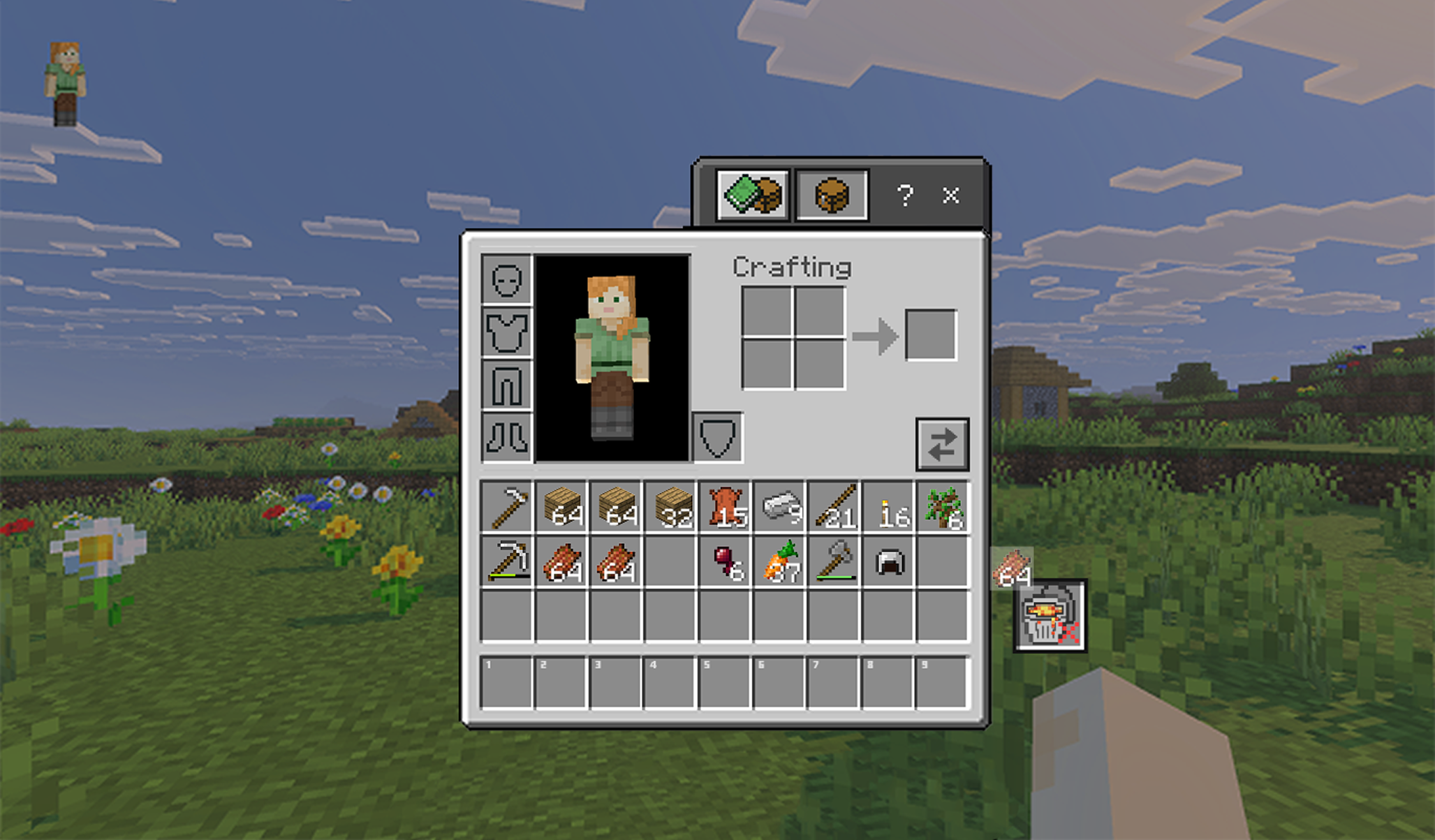
Minecraft’s Current Inventory - Bedrock Edition
Survival Mode
Creative Mode
Competitive Analysis
Preliminary Research
First I looked at games with inventory systems similar to Minecraft to see how they improve the player experience. While reviewing these games, I focused on 3 things:
The QoL features they include
How well those features have scaled over time
Pain points players still report that I would want to avoid in my own redesign
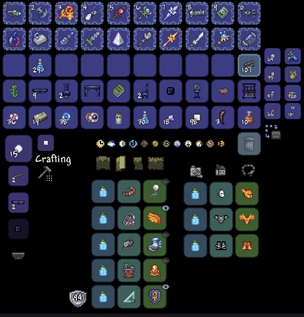
Terraria: Minecraft’s 2D Cousin
Organization Features:
Sort Inventory to organize items by type
Favorite item lock that prevents players from quick trashing an item, or moving them by accident
Quick stack to a nearby chest function that moves matching items to a chest nearby
Scalability:
Scales well as new items are added due to QOL features like sorting and quick stacking to nearby chests
User Pain Points:
Inventory fills up very quickly, forcing players to stop and spend time reorganizing and managing their items
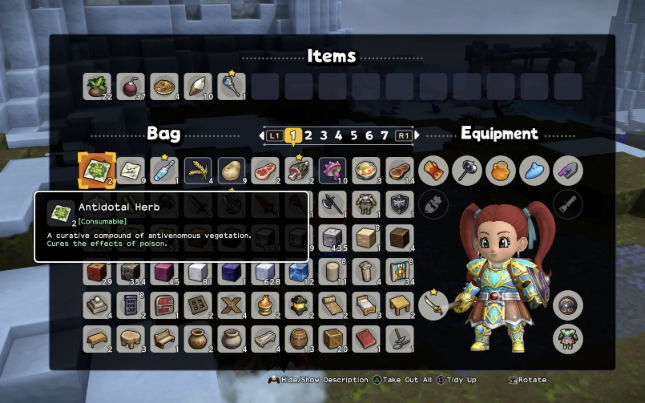
Dragon Quest Builders 2: A Sandbox RPG
Organization Features:
Provides shortcuts for quickly moving items between slots and containers
Includes auto sorting that groups similar items together
Scalability:
Uses a centralized storage system called a Coffer to help players manage their inventory over time
Limits how many chests can be placed in world, which reduces how well the system scales as players collect more items
User Pain Points:
Chest limits interrupt the player’s ability to store and organize building materials and other items
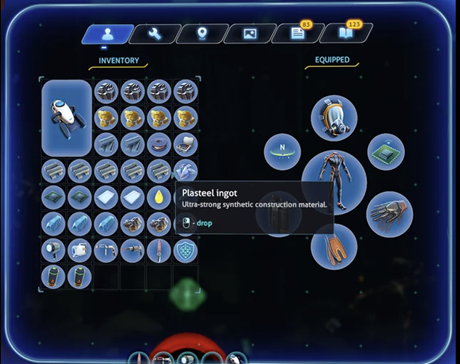
Subnautica: Deep Sea Survival
Organization Features:
Organization tools are limited by design, but players can pin recipes to see required materials while exploring
Players mostly rely on long-term storage like base lockers, with a lack of immediate on-the-go storage
Scalability:
Does not scale as well as other inventories, since fixed lockers limit where items can be stored and make new items harder to integrate
User Pain Points:
Resources cannot be stacked and each one takes up its own slot, which limits player efficiency
Traveling back and forth to lockers takes time away from the more enjoyable parts of the game
Key Takeaways

QoL features like filtering and sorting become increasingly important as the amount of in-game items grow

Storage friction can pull players away from their favorite parts of gameplay

Inventory systems that centralize or simplify storage still need to respect how players mentally organize their items
User Research
User Survey Overview
I ran a short survey to understand where Minecraft’s inventory creates friction and how those issues relate to what players are trying to accomplish in game. My goal was to validate common bottlenecks, identify which activities they affect most, and see where those frustrations overlap.
I gathered quantitative data by asking players to rate their agreement with inventory related statements on a 7 point Likert scale from strongly disagree to strongly agree, so I could spot trends easily and prioritize which inventory problems needed to be tackled. The sample size was small (6 players), so the findings aren’t statistically representative, but they still revealed clear patterns I could design around.
Player Profiles
The survey was divided into two main sections to reduce cognitive load for participants. The first focused on inventory management issues like clutter and navigation, and the second looked at what gameplay activities players preferred, such as building, mining, exploring, and combat.
Inventory needs are context dependent, so I categorized gameplay activities to into four player profiles:
Builders
Fighters

Explorers

Miners

I broke down each participant’s Likert scale answers for both player activities and inventory frustrations, then meaured the mean. While participants selected a preferred way to play, I also scored their answers across each activity category to see which player type felt the most pressure from specific inventory bottlenecks.
This helped me identify the pain points each profile experiences with the inventory and how those issues change depending on gameplay context.
Builders
Overview:
Builders get enjoyment through creative expression. These players are drawn to the open ended sandbox elements of Minecraft. They value freedom and organization when playing.
Inventory Use:
Will keep a variety of block types with them
Frequently switches between different tools/blocks/items
Pain Points:
Available inventory slots fill quickly
Constant block/item swapping

Explorers
Overview:
Explorers are drawn to discovery and novelty. They like to roam their world to find new biomes or landmarks. And will explore rare structures like Shipwrecks and Ancient Ruins.
Inventory Use:
Keeps key survival items like food, weapons, tools, and a bed on hand
Makes use of shulker boxes and bundles to extend their inventory capacity
Prefers to keep important survival items visible and easy to access
Pain Points:
Difficult to manage inventory capacity while finding new loot
Frequently has to drag and drop unwanted items out of their inventory

Fighters
Overview:
Fighters enjoy the challenge of tough mob battles, such as the Ender Dragon. They focus on upgrading their weapons and armor and will go out of their way to find interesting bosses to fight.
Inventory Use:
Keeps weapons and potions close by in their hotbar
Often swaps between different weapon types (ie, Sword vs. Crossbow)
Pain Points:
Rearranging items mid combat disrupts game flow
Unstackable items quickly clutter their inventory
Miners
Overview:
Miners are focused on mastery. They gather resources to upgrade their gear, and will often automate parts of their world. They spend most of their time in caves and strongholds rich in resources.
Inventory Use:
Keeps their pickaxe, torches, and sword in the first few hotbar slots
Carries multiple backup tools in case their main ones break
Pain Points:
Inventory space fills quickly while mining
Drops unwanted items constantly (ie. cobblestone/Gravel)
Hard to sort or move items around in bulk
Research Insights
Below are the most common frustrations that participants strongly agreed with across all player profiles. These were used to help me define my design goals.





Research Documentation
Turning Pain Points to Design Goals
Pain Points
The Inventory becomes cluttered quickly, with no efficient way to organize or clean it
Moving multiple different items within the inventory is slow, and repetitive
Finding specific blocks or items requires navigating through several tabs, interrupting game flow

Design Goals
Create a trash bin button in order for Builders and Miners to quickly discard unneeded items and feel less overwhelmed by clutter.
Create an auto sort button in order for Miners and Explorers to stack and compress items so they can free up inventory space for more resources and loot.
Modify the item selection and hotbar system in order for Explorers and Fighters to quickly access and organize key items so they can stay immersed in gameplay.
Define a favorites category in the recipe and creative menus in order for Builders and Explorers to quickly reuse and craft their go to items and feel more in control of their loadouts.
Proposed Solutions

Trash Bin Button
Allows players to drag items to the bin and completely delete the item. This way, players don’t have to drop items. And risk accidently picking them back up.
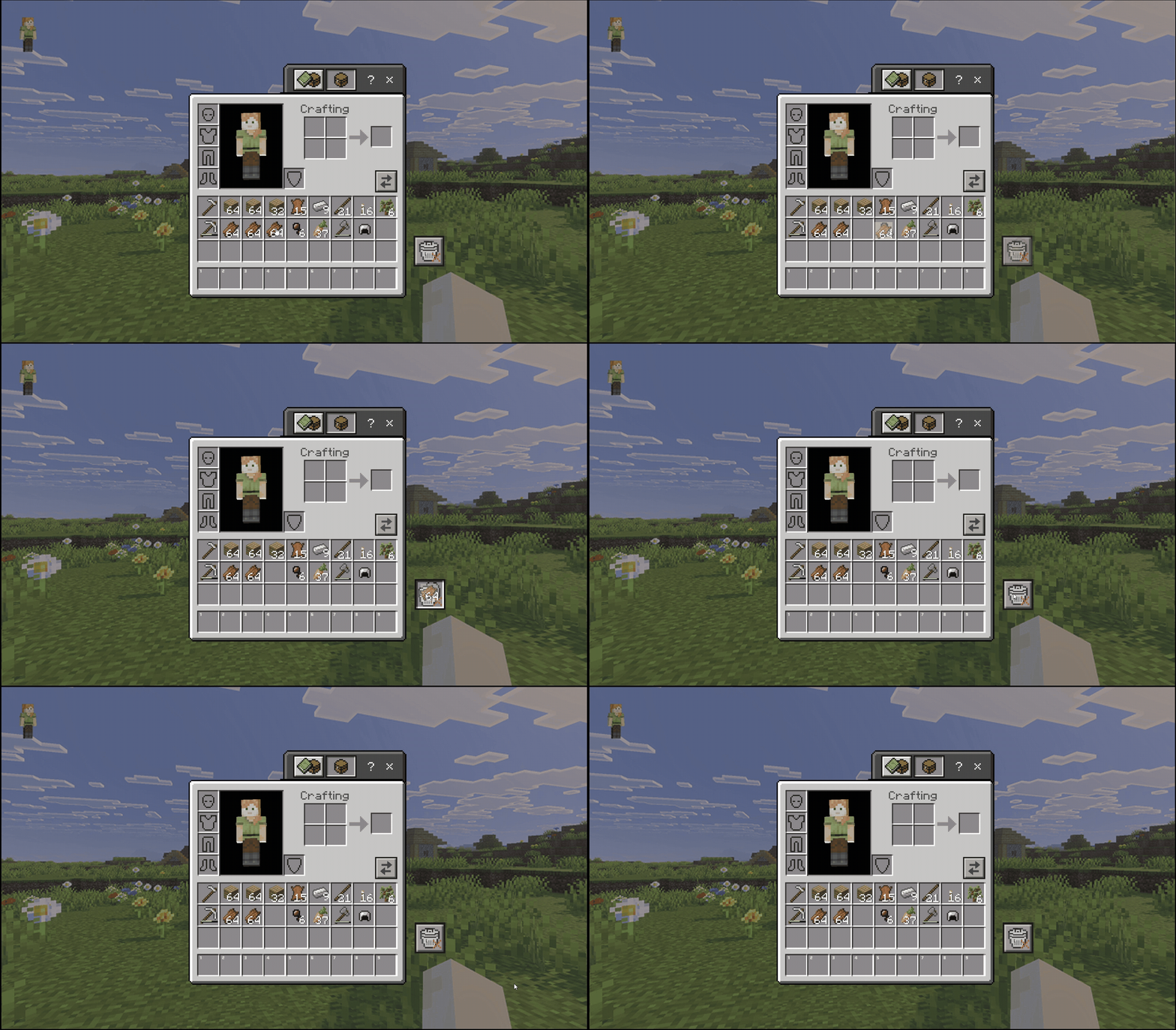
Above is a prototype showing how a player deletes a stack of unwanted items from their inventory. As the player drags the stack onto the trash can icon, the lid opens, then closes as the item is deleted, giving clear visual feedback that the item is gone.
Builders
Primary Users:
Explorers

Multi Select Function
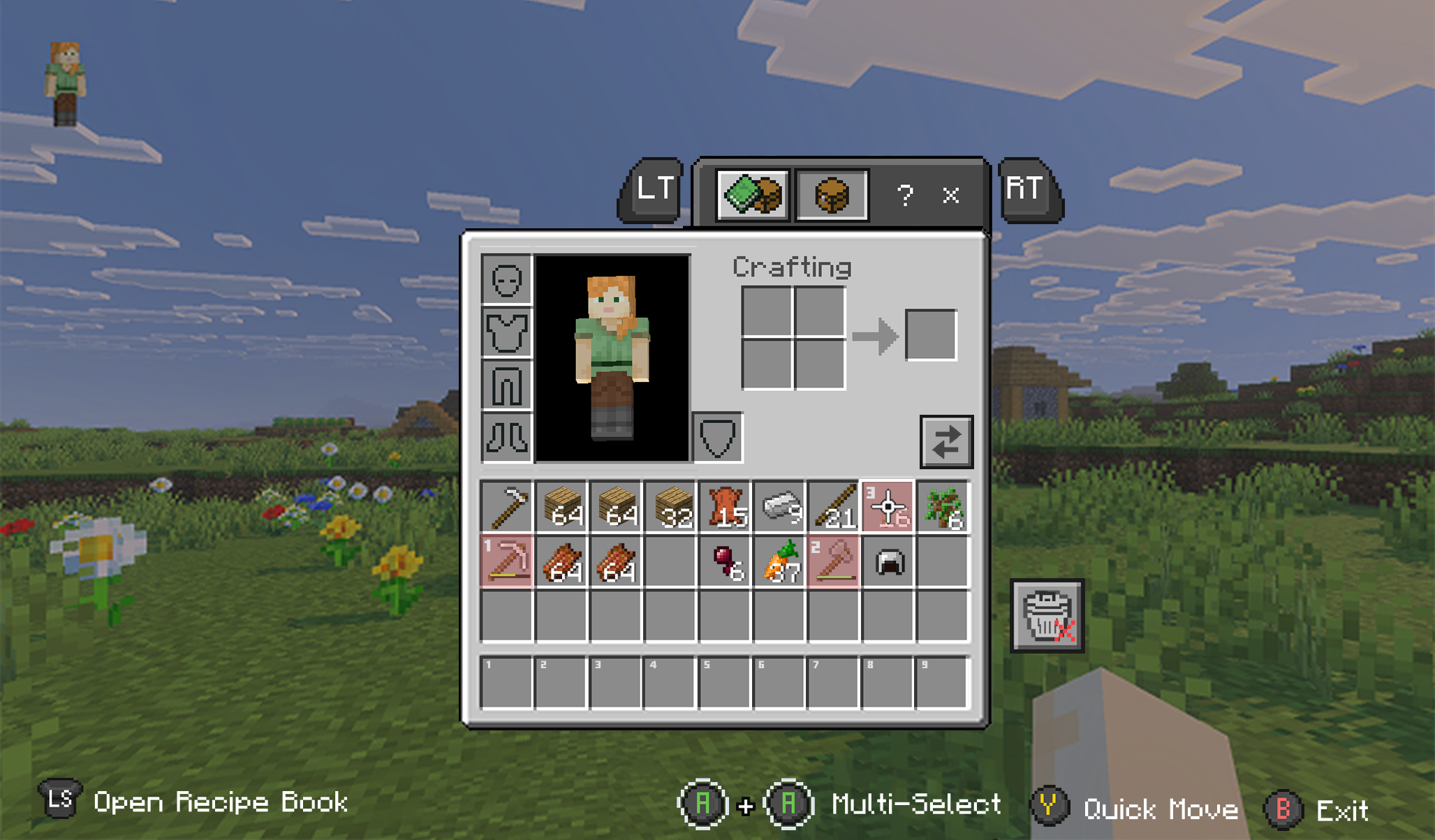


Players can multi select items in their inventory one at a time, and then send the selected items to either their hotbar, or a chest in the order they were selected.
A version of this already exists for PC players where pressing the number keys moves an item straight into that hotbar slot. Console and controller players don’t really get that same level of control, since there are fewer available inputs without making the inventory more complex. Instead of reworking the entire control scheme, this concept adds a multi select mode, where a face button (A/X/B) is temporarily used to highlight multiple items, by double tapping it first.
Miners
Builders
Miners
Primary Users:
Fighters
Auto-Sort Button

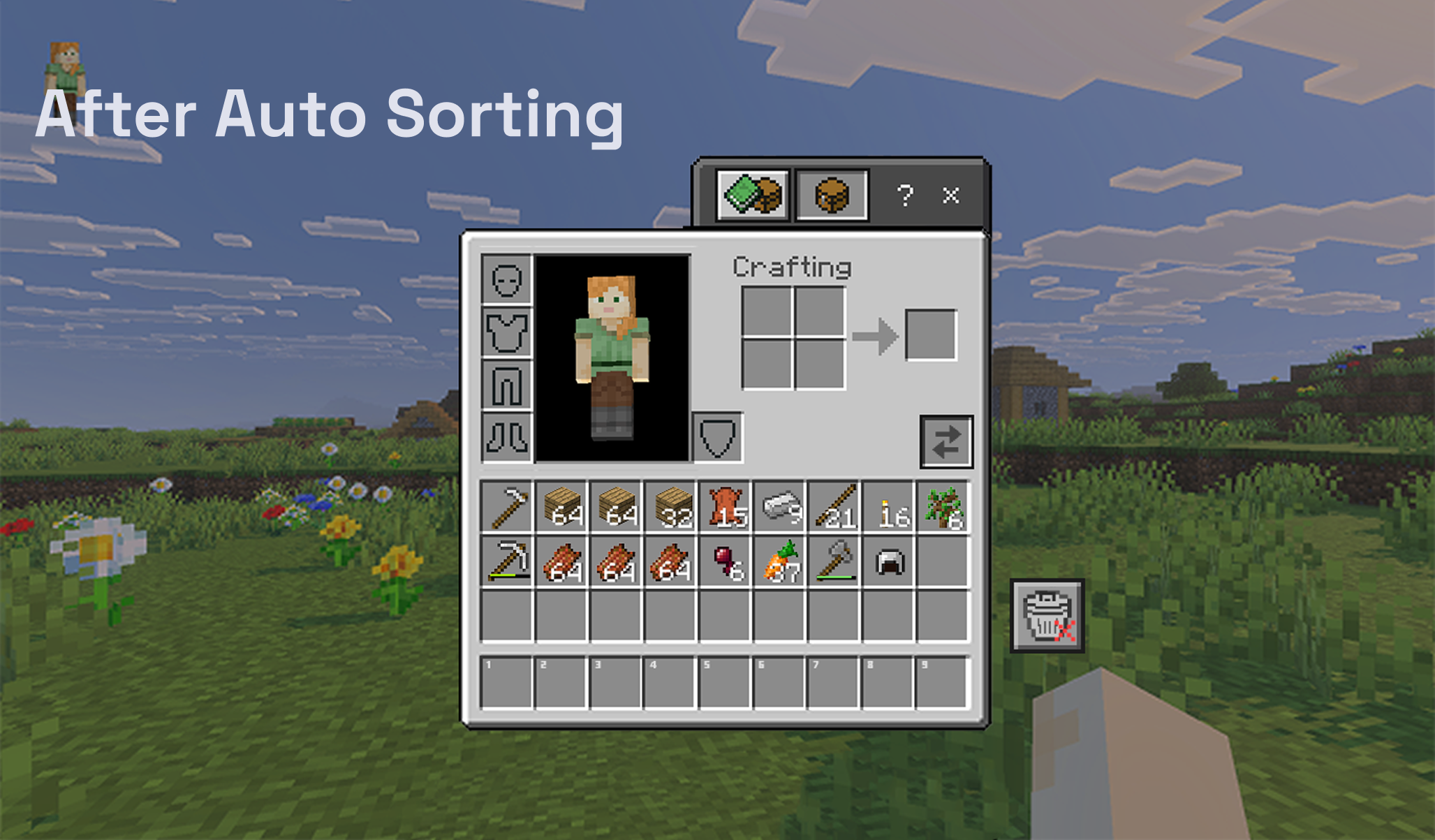
To quickly organize their inventory, players can use the auto sort button, which stacks similar items together and shifts them to the left to free up more space.
Hold and Drag Function


Players can also hold and drag across several different items in their inventory and in bulk move them between inventories, or in the example here to the trash bin
The player is no longer limited to quickly removing items from a single stack. They can now drag across multiple different item types in their inventory to move or delete them in one action.

Builders
Miners
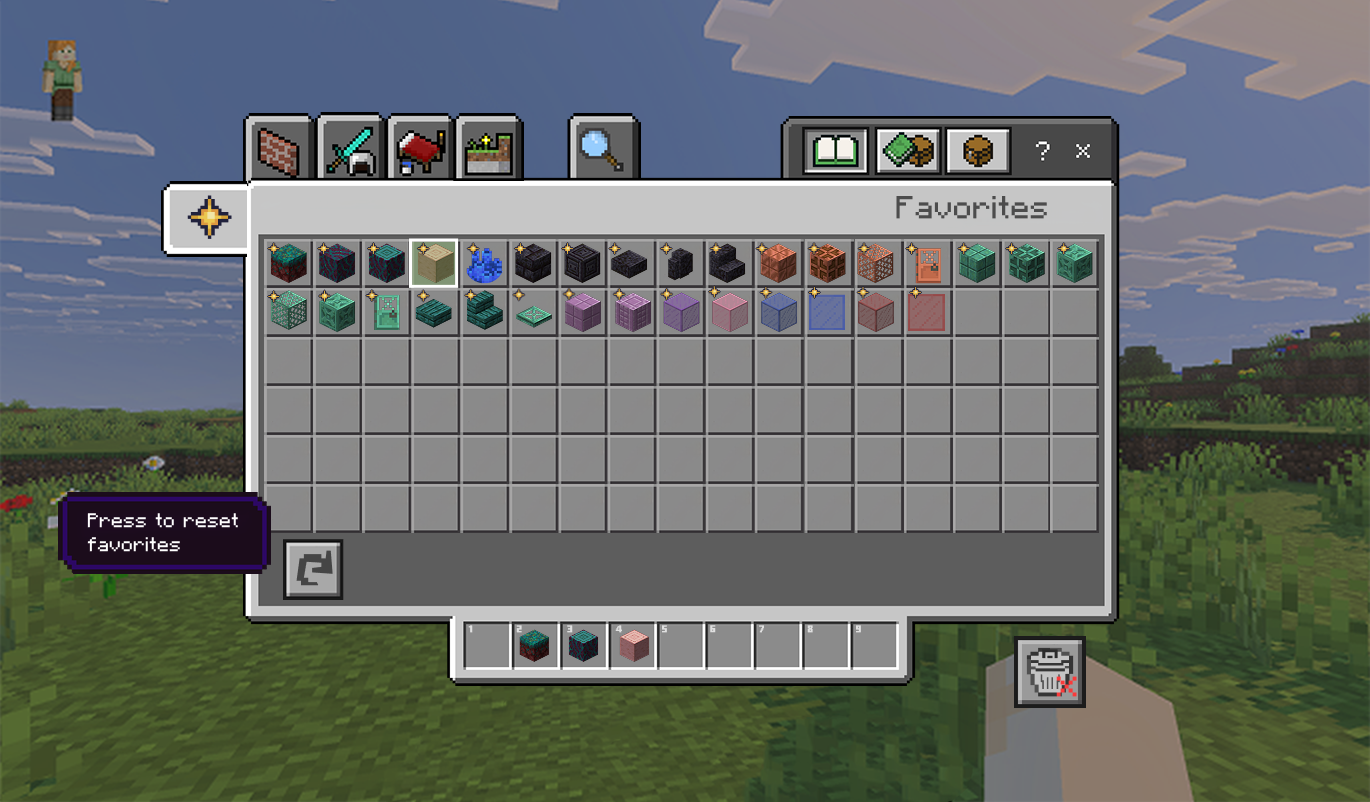
Favorites Category - Survival Mode
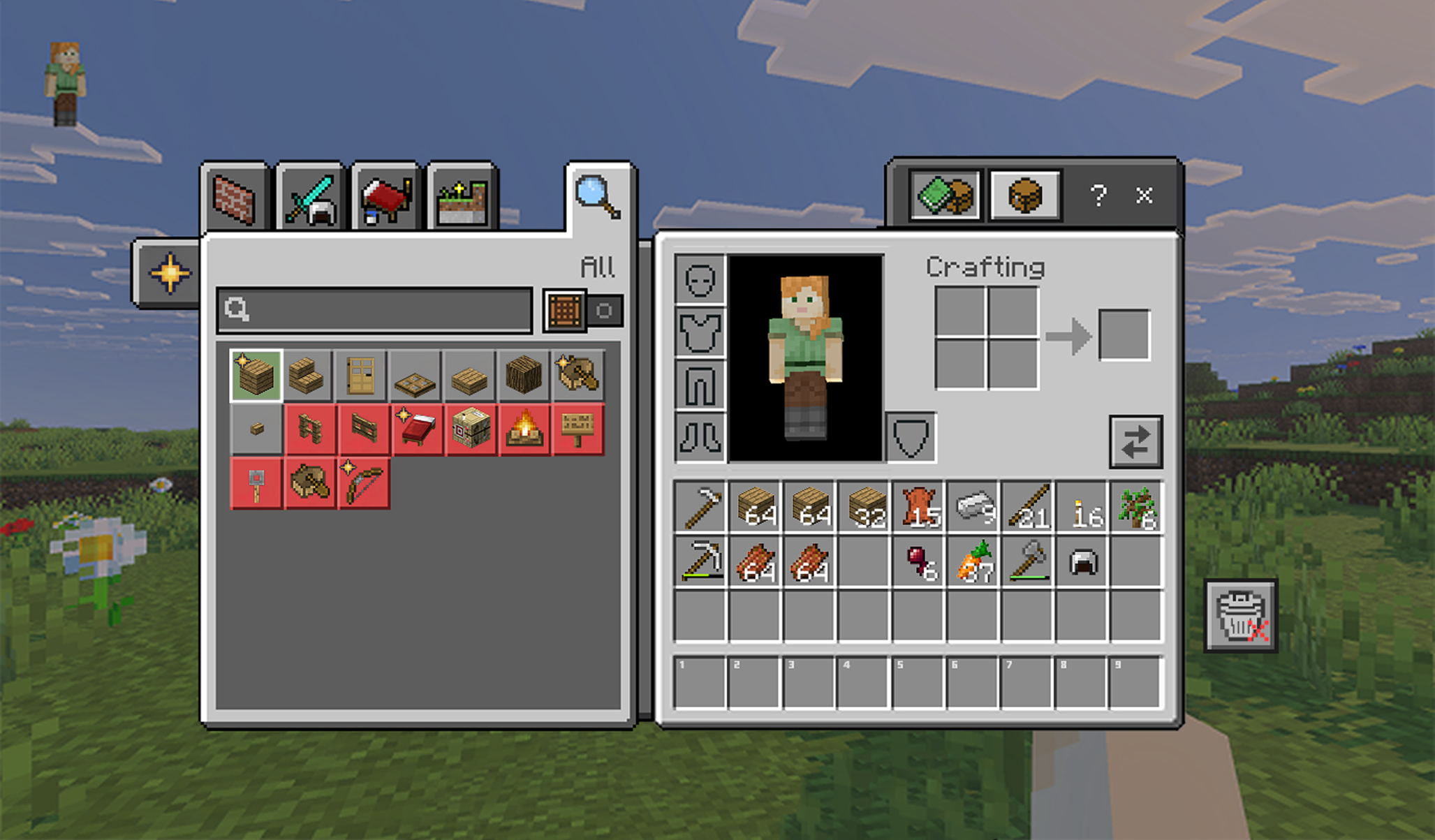
To streamline crafting in Survival mode, players can star items and recipes as favorites and access them from a dedicated Favorites tab, so they can quickly craft the things they use the most. Favorites are indicated with a star, and will show up in the corner of each favorited item in the Recipe book.
Initially, I planned to place the Favorites tab at the bottom opposite the search bar, but that wouldn't work well with the controller tab navigation. As more categories get added, players would have to scroll through every tab before reaching Favorites, which defeats its purpose and goes against my goal of making a future facing system. I moved it to its current position so controller players can quickly reach the Favorites tab.
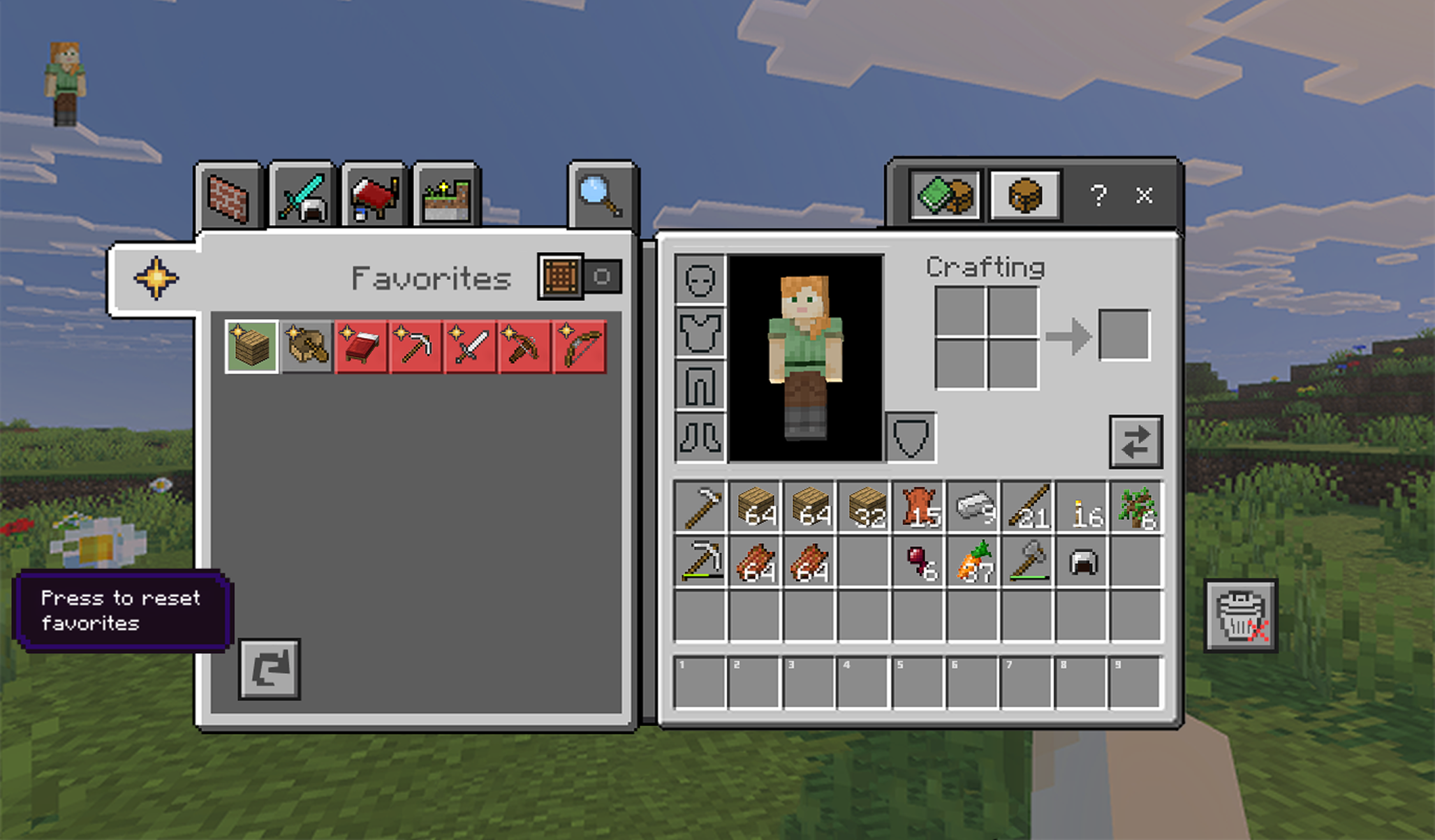
Players can reset their favorites back to default, so as they add more items over time, the category doesn’t lose its usefulness as an organization tool.
Primary Users:
Builders
Primary Users:
Explorers
Miners
Favorites Category - Creative Mode
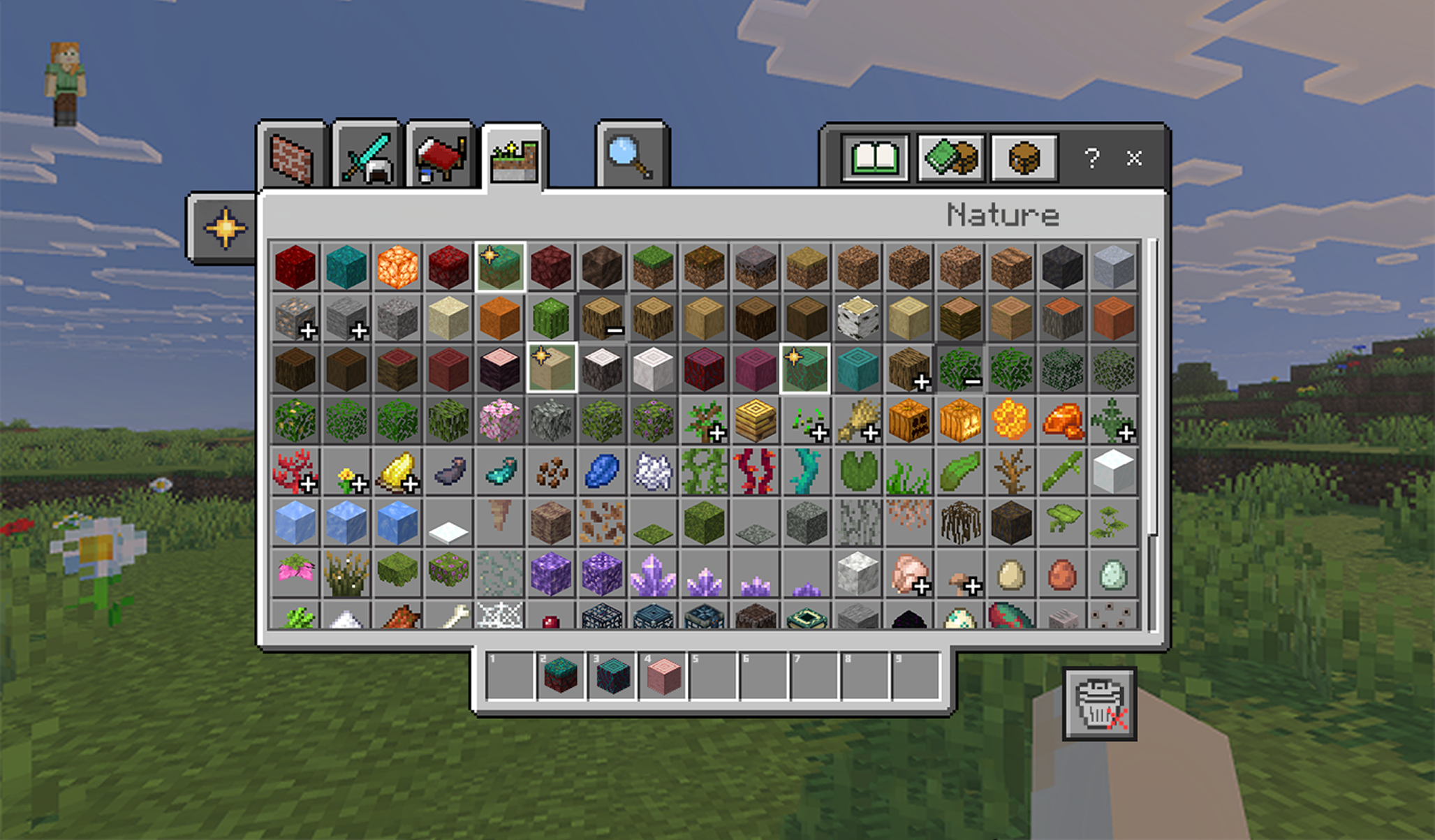
Each feature also carries over to Creative mode, but the Favorites category plays a much bigger role there. In Creative, players rely on specific block types, so having a reusable block palette on hand becomes especially helpful.
The full extended menu helps with visibility, and the plus icon makes it easier to dig into related block types. However, players still have to repeatedly find and swap between different tabs or options in order to find the block they need. When starting a new world, they can star the blocks they typically like to use and quickly return to them later instead of searching again, as they make different builds.

Retrospective
Challenges Faced
Trying to balance designing new features with a preexisting IP, that's known for its simplicity.
To help with this I focused on designing optional and supportive QoL features rather then a full layout overhaul.
Only having a limited sample size for my user study, which affected how confident I could be in the data I was collecting.
Next time I’d focus on including also doing basic hueristics tests with other UX Designers to help gauge if I’m on track
Finding ways to design around the input constraints from controllers, as I was coming up with features it became harder and harder to find ways to include console and controller players without overloading the control scheme
This made be think about ways to reuse the same controls but with different contexts so that there’s more modularity
What I’ve Learned
One of the areas my project is weak in, is futher user testing on the prototypes themselves. I spend a lot of time trying to do initial research, and I really wanted to practice analyzing quantitative data to look for patterns, which meant that I started working on the mockups later. But UX has to be agile, and I should have been designing the wireframes in parallel and adjusting them with each new insight. My goal next is to focus on being as agile as I can when designing prototypes, even in those initial stages.